Step by step
-
Navigate to “Front Office”
– Locate the left-hand menu on your dashboard.
– Look for the “Front Office” icon, represented by a fork and knife.
– Click on the “Front Office” icon.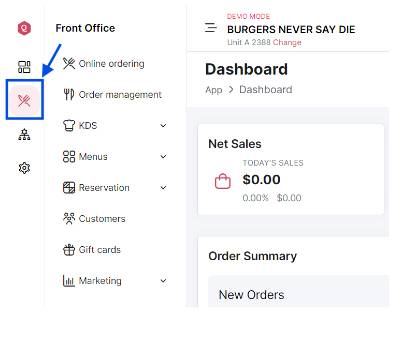
-
Click on “Menus”
From the dropdown click on “Menu Builder”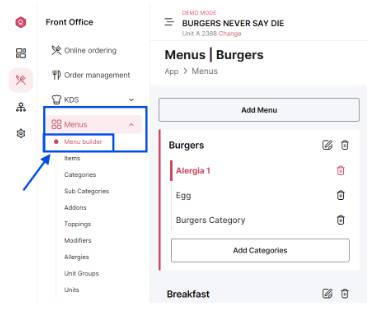
-
Add to Menu
Click on the “Add Menu” button.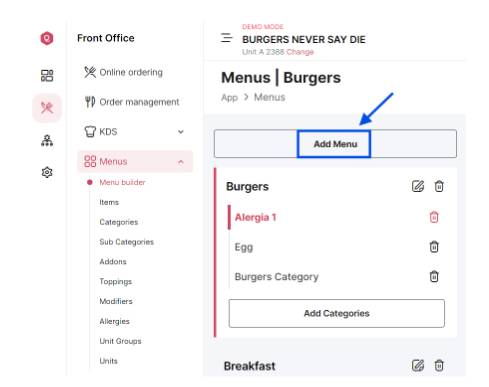
-
Enter new menu details
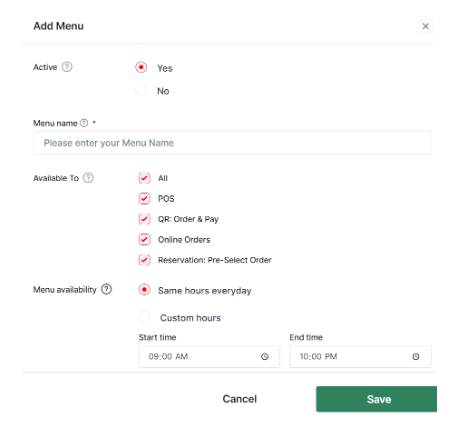
-
You’re done! You’ve now added a new Menu
Just had a look at va88bet. Worth a try? Could be good chance to make some money! Check it out yourself, maybe you will find a jackpot: va88bet
Alright, so OKVIP78win isn’t bad. It’s got a pretty standard casino layout, but some of the games are a bit more unique. Not a huge fan of the color scheme, but that’s just me. Check it out for yourself okvip78win.
Gotta follow bettilttwitter to stay on top of their game. They’re always droppin’ hints and teasers. Don’t miss out!
Anyone tried VND789bet? I did a little dabble. Site was easy to navigate, which is a big plus. The live casino was alright, tables were full enough to be interesting. Could use more promotions, but overall not bad. Take a punt: vnd789bet!
Opa! Me falaram da Stakerbet, e parece que tão dando uns bônus maneiros. Será que vale a pena se cadastrar? Alguém aí já testou a plataforma deles? Dá uma olhada aqui: stakerbet
Yo, 1pra1bet is giving me good vibes! Nice interface and the odds are looking competitive. Give them a whirl! Here’s a link: 1pra1bet
RW88Bet? Yeah, not bad at all. They’ve got a good selection of games and the odds seem pretty fair. I’ve had a few lucky wins there! Worth checking out, especially if you’re looking for something new. Just be responsible, of course! Check out rw88bet!
VBO99Bet – I’ve been playing on this site for a few weeks, and I’ve had a pretty good time. The website is easy to use, and they have a good selection of games. The bonuses? Not super amazing, but definitely worth claiming. Give vbo99bet a spin!
Tried BG88Bet recently. Decent variety of games, especially if you’re into slots. The bonuses are okay, nothing groundbreaking. It’s a reliable choice, though! Go to bg88bet.
Signed up to ww888casinologin the other day. The registration was smooth. Their game selection wasn’t too bad at all. Give it a look. Check it out here: ww888casinologin
Trying my luck at w88clubvip. The VIP perks look tempting, and they have a good range of betting options. Hoping some wins are coming my way! Check it out here: w88clubvip
Been playing on s888slot for a bit now. They have some really addictive slot games. Payouts have been decent too. Always a fun way to spend some downtime, I think. Check it out here: s888slot
Heard some buzz online about OAN88 and how great they are so definitely worth checking out. I’m just getting started now but have already played a few times and won some money! Give it a try yourself! Sign up here oan88.
1xbetkorea is where it’s at for Korean players! Lots of options and a really easy to use interface. You should seriously check it out 1xbetkorea
77win is a really solid platform, especially if you’re into mobile gaming. The app is smooth and the games are fun. Check it out 77win
Для эффективного продвижения стоит использовать качественные базы хрумер https://www.olx.ua/d/uk/obyavlenie/progon-hrumerom-dr-50-po-ahrefs-uvelichu-reyting-domena-IDXnHrG.html, собранные вручную.
Was messing around on dr88us the other night. Won some lost some that is the way she goes. Solid enough platform. Have a look: dr88us
I’ve used 99gameapk and I must say, downloading APKs is a breeze here. The games work, haven’t had any sketchy stuff happen. Give it a go: 99gameapk
7cx, it looks pretty well-thought-out, UI is friendly, and pages load fast. Give it a try if you found it via search: 7cx